
- South Korea is technically still at war with North Korea, and on national-security grounds it restri…
- Google Maps isn’t completely useless in Korea.
- For travelers, NAVER Map is the one to learn.

Who this is for
- Anyone who’s opened Google Maps walking directions in Seoul and watched nothing happen
- People who heard “Google got approval in 2026” and assume it’s fixed
- Anyone who can’t get a small café to show up in search
The map loads. The directions don’t.
The wall you hit with Google Maps in Korea isn’t a bug or a bad connection. It’s a law. Korea has restricted the export of high-precision mapping data for decades, and Google routes its navigation through servers abroad. Here’s the thing: this is a regulatory problem rather than a technical one, which means waiting it out doesn’t work.
“So what do I install?” What you need isn’t a backup app so much as a change of assumption. One habit that carries you through every other country stops working at this border. Seoulog sorted it by task—let’s get into it.
1. It’s the Law? Why Google Maps Doesn’t Work in Korea
✔ The restricted data is the 1:5,000-scale map
South Korea is technically still at war with North Korea, and on national-security grounds it restricts exporting high-precision map data—specifically the 1:5,000-scale data that turn-by-turn navigation needs.
Google processes map data on servers outside Korea, which runs straight into that restriction. The result: no walking navigation and no driving navigation inside the country, for years.
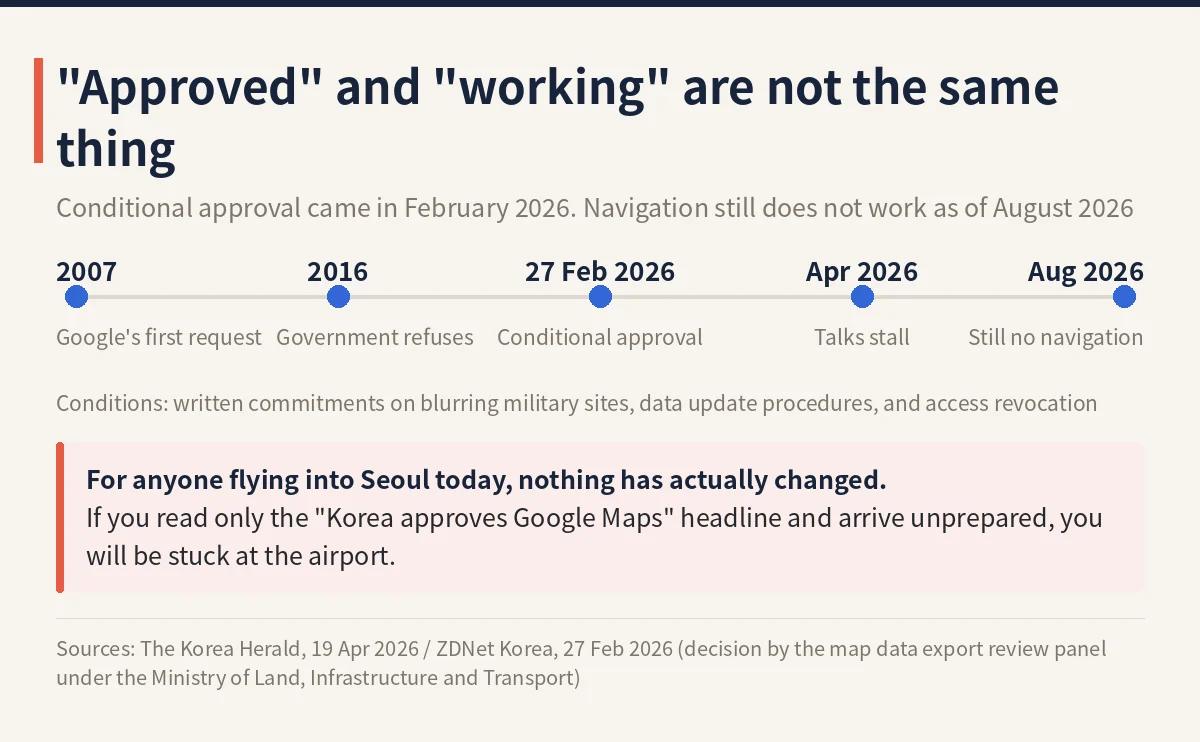
Google had been applying for an export licence since 2007. On February 27, 2026, Korea’s Ministry of Land, Infrastructure and Transport finally granted conditional approval—with strict requirements like blurring military sites and processing certain data domestically. The thing to hold onto: approval is not the same as launch.
✔ This isn’t the only answer. “Naver Map’s Problem Is the Database, Not the Translation” is the other option worth weighing.
2. Don’t Delete It! What Google Maps Can and Can’t Do
✔ The line falls here
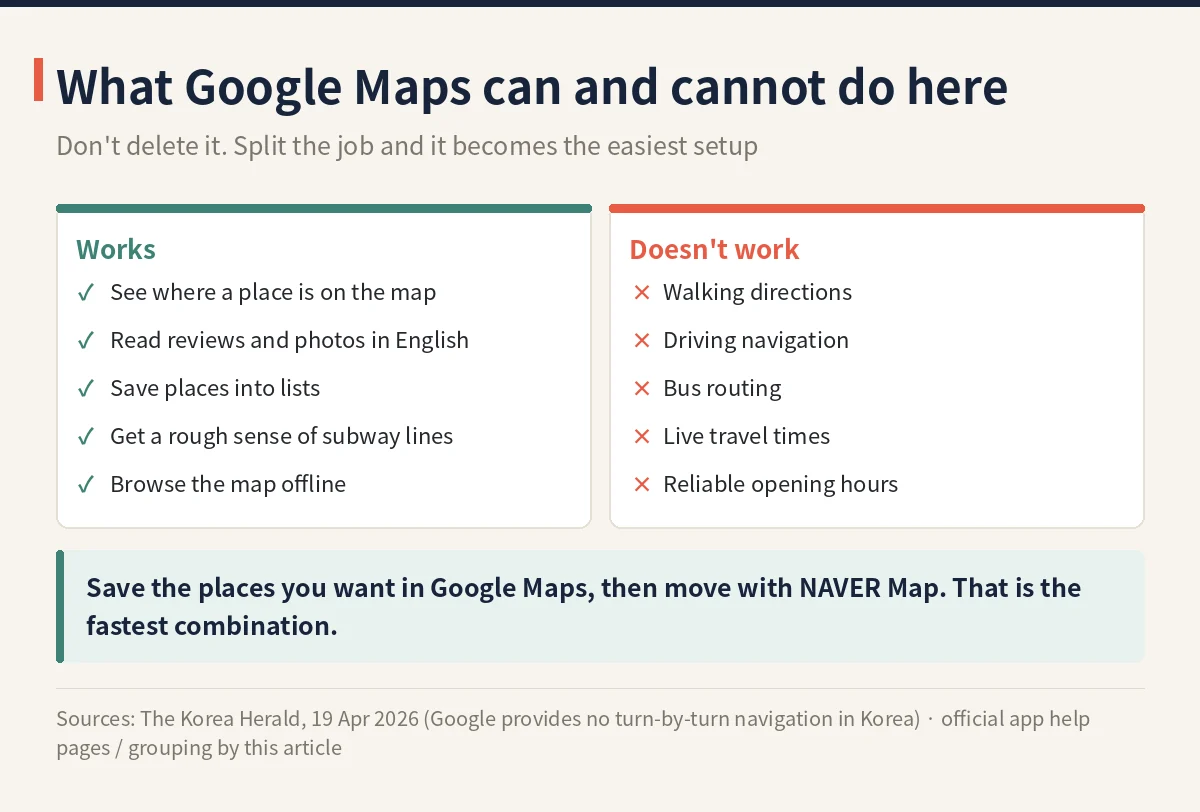
Google Maps isn’t completely useless in Korea. In practice, this is where the line falls:
- Works: searching places, checking hours and reviews, seeing your current location on the map
- Partially works: subway and bus transit directions (routes appear, but detail and accuracy are thin)
- Doesn’t work: walking navigation, driving navigation, reliable route timing
The transit results won’t show subway exit numbers or real-time bus positions. The classic failure mode: the subway ride goes fine, then you spend 20 minutes lost on the “last five minutes of walking” from the station to the restaurant.
3. The One App to Learn! NAVER Map, Your Main App (English UI)
✔ This is the one to learn
For travellers, NAVER Map is it. Switch the language to English in the app settings and the menus and turn-by-turn directions all display in English.
Search tips
Major attractions, hotels and chain stores show up fine when you search in English. Small cafés and local restaurants are a different story—searching by the Korean name is far more reliable.
The fastest real-world trick: copy the Korean place name from an Instagram post or blog and paste it straight into NAVER Map. Or use Papago (NAVER’s translation app) to convert the name to Korean first—it handles place names better than most translators.
Saving places and transit directions
Bookmarking places requires a free NAVER account, so sign up before your trip. Save everywhere you want to go and sort the pins into lists by neighbourhood—it makes each day’s route obvious at a glance.
Transit directions use real-time data and go deep on detail: subway exit numbers, and even which car to board for the fastest transfer. The walking navigation is accurate too, including in alley mazes like Myeongdong and Hongdae.
4. Only on Bus Days? Kakao Map: When It’s Worth Having
✔ The other big local app
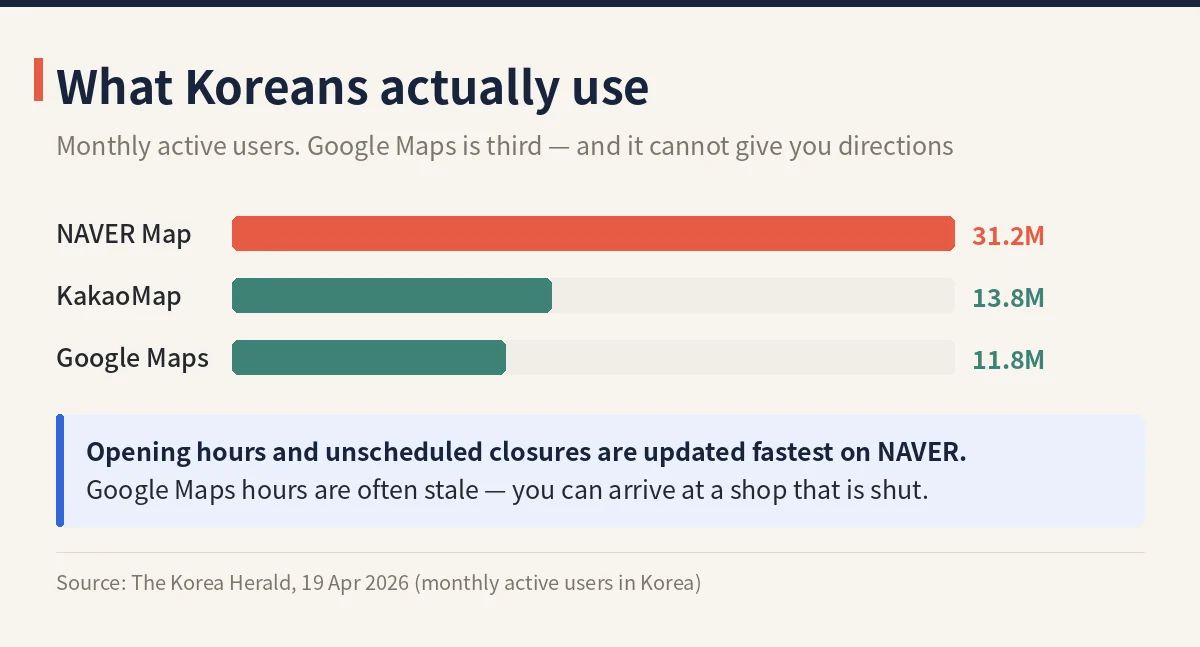
Kakao Map is the other big local map app, and among Koreans it’s arguably the default. The interface is mainly Korean and English; it works fine for English speakers.
Its strong points are real-time bus arrival info and a particularly clear walking view. If your itinerary leans on local buses—common if you venture beyond central Seoul—it’s worth running alongside NAVER Map.
That said, you don’t really need both apps on day one. If it’s your first short trip and you’re mostly on the subway, NAVER Map alone covers you—add Kakao Map only if buses become a thing. Neither works offline, so sort out a SIM, eSIM or pocket Wi-Fi before you need directions.
What you need to file before you land is in the K-ETA and e-Arrival Card guide.
5. Base Fare 4,800 KRW! Which App for What, Plus Kakao T for Taxis
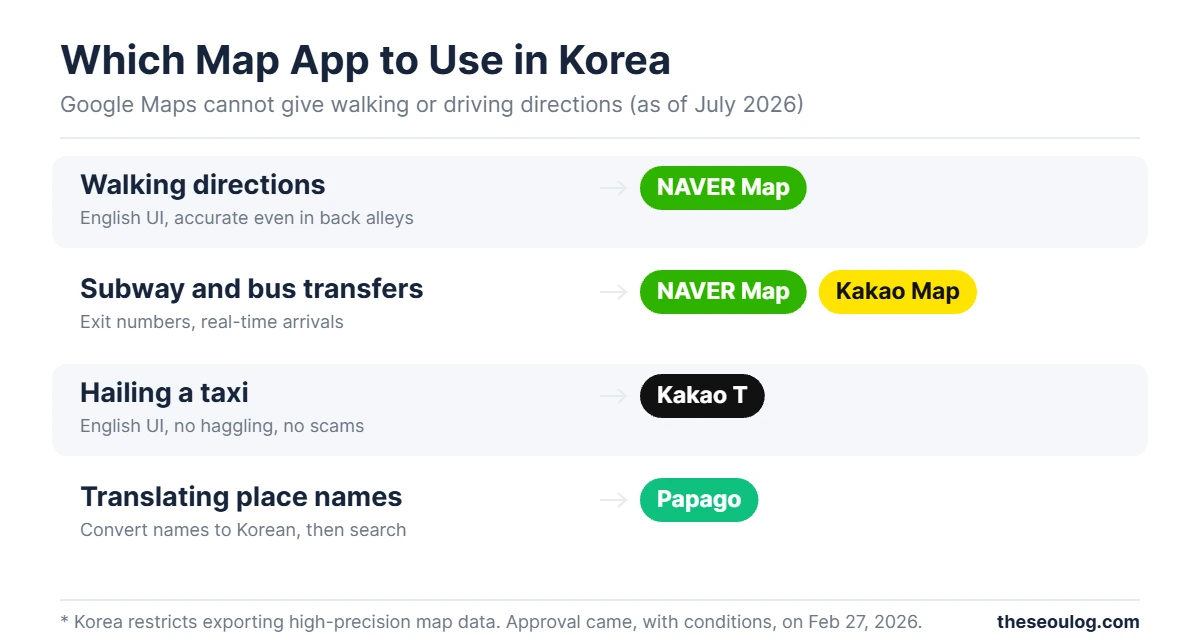
| Task | Best app | Why |
| Walking directions | NAVER Map | English UI, accurate even in back alleys |
| Subway and bus transfers | NAVER Map / Kakao Map | Exit numbers, real-time arrivals |
| Hailing a taxi | Kakao T | English UI, no haggling, no scams |
| Translating place names | Papago | Convert names to Korean, then search |
✔ For taxis, Kakao T is the standard
It’s Korea’s equivalent of Uber. It has an English UI, and you can register with your home-country phone number (US +1 included).
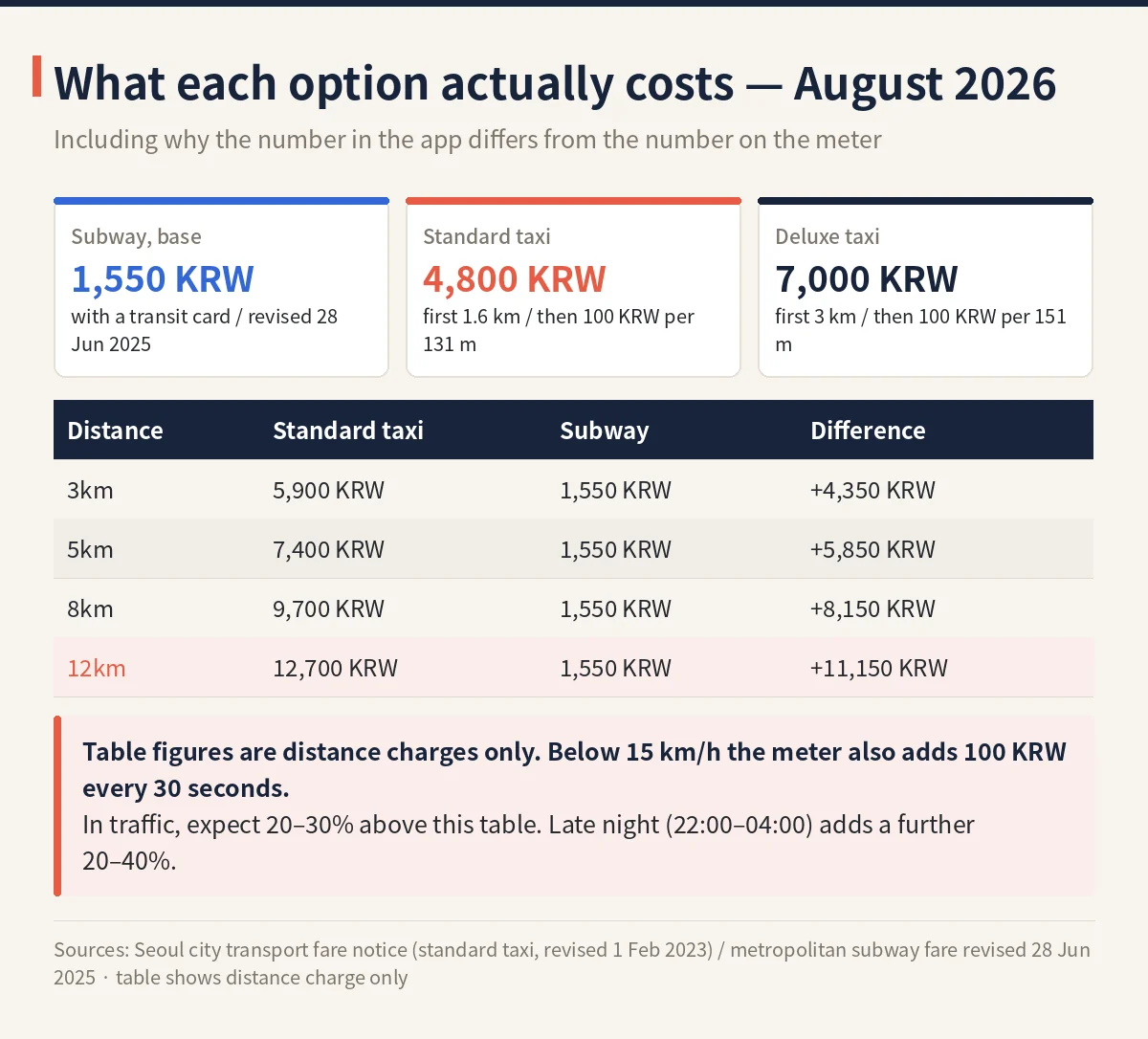
One catch: foreign credit cards sometimes fail at in-app registration. Set the payment method to “pay driver directly” and pay by card or cash in the cab—every Seoul taxi takes cards. Base fare for a regular Seoul taxi is 4,800 KRW (about $3.50).
- Google Maps walking and driving navigation don’t work in Korea (as of July 2026)
- Map data export got conditional approval in February 2026, but it’s not live in the app yet
- NAVER Map is your main app — English UI; sign in to save places
- Search small spots by their Korean names; copy-paste or convert with Papago
- Add Kakao Map for bus-heavy days and Kakao T for taxis
If I could make visitors do exactly one thing before boarding: download NAVER Map and search your hotel by its Korean name while you’re still on Wi-Fi at home. Everything else can wait until you land.
When travel friction comes from technology, it tends to resolve itself over time. When it comes from regulation, it doesn’t. This one is the second kind—so install NAVER Map before you fly.
Frequently asked questions
Why does Google Maps navigation not work in Korea?
On national-security grounds Korea restricts exporting the 1:5,000-scale map data that turn-by-turn navigation requires. Google processes map data on servers outside the country, which runs straight into that restriction.
I heard Google got approval in 2026 — is it fixed?
On February 27, 2026 the Ministry of Land, Infrastructure and Transport granted conditional approval, with requirements like blurring military sites and processing some data domestically. Approval is not the same as launch: as of late July 2026, walking and driving navigation still do not work. Do not plan a trip around Google flipping the switch.
Is Google Maps useless in Korea then?
No. Searching places, checking hours and reviews, and seeing your current location all work fine. Subway and bus directions partially work — routes appear, but you get no exit numbers and no real-time bus positions. What genuinely fails is walking navigation, driving navigation and reliable route timing.
So what should I install instead?
Make NAVER Map your main app — it has an English interface and its route results include the subway exit number. Add Kakao T if you plan to take taxis, since that is how you hail one.
Do I need Kakao Map as well?
Not really. NAVER Map is enough for most trips. The two surface place information differently, so keep Kakao Map as a backup for when a specific shop will not come up in NAVER.
What should I set up before I fly?
Install the apps, set the language and allow location access before you land. Copy and save the Korean names of places you want to visit — that is what makes searching work once you are there.
- Incheon Airport to Seoul 2026: Train, Bus, Taxi Costs
Your first ride in Seoul, before any map app matters — with 2026 fares.
This article is based on the official information below. Rules can change, so please check the original before you travel.
· Korea Tourism Organization official site
Information as of 2026-08-06 (official listings and Google Maps as shown at publication). Updated when things change.