- The conclusion is simple.
- A foreign Apple ID can get there.
- Android phones bought outside Korea do not support mobile T-money — the system assumes a domestic ha…

Who this is for
- iPhone users who want to tap through Seoul’s gates the way Suica works in Tokyo
- Anyone who tried adding T-money from Wallet and stalled at the card step
- Android carriers wondering whether to give up on mobile transit entirely
On 22 July 2025, Korea finally let the iPhone become a transit card. Add T-money to Apple Pay, tap the gate, walk through—with an Express Mode that keeps working for hours after the battery dies. The experience is close to Japan’s Suica.
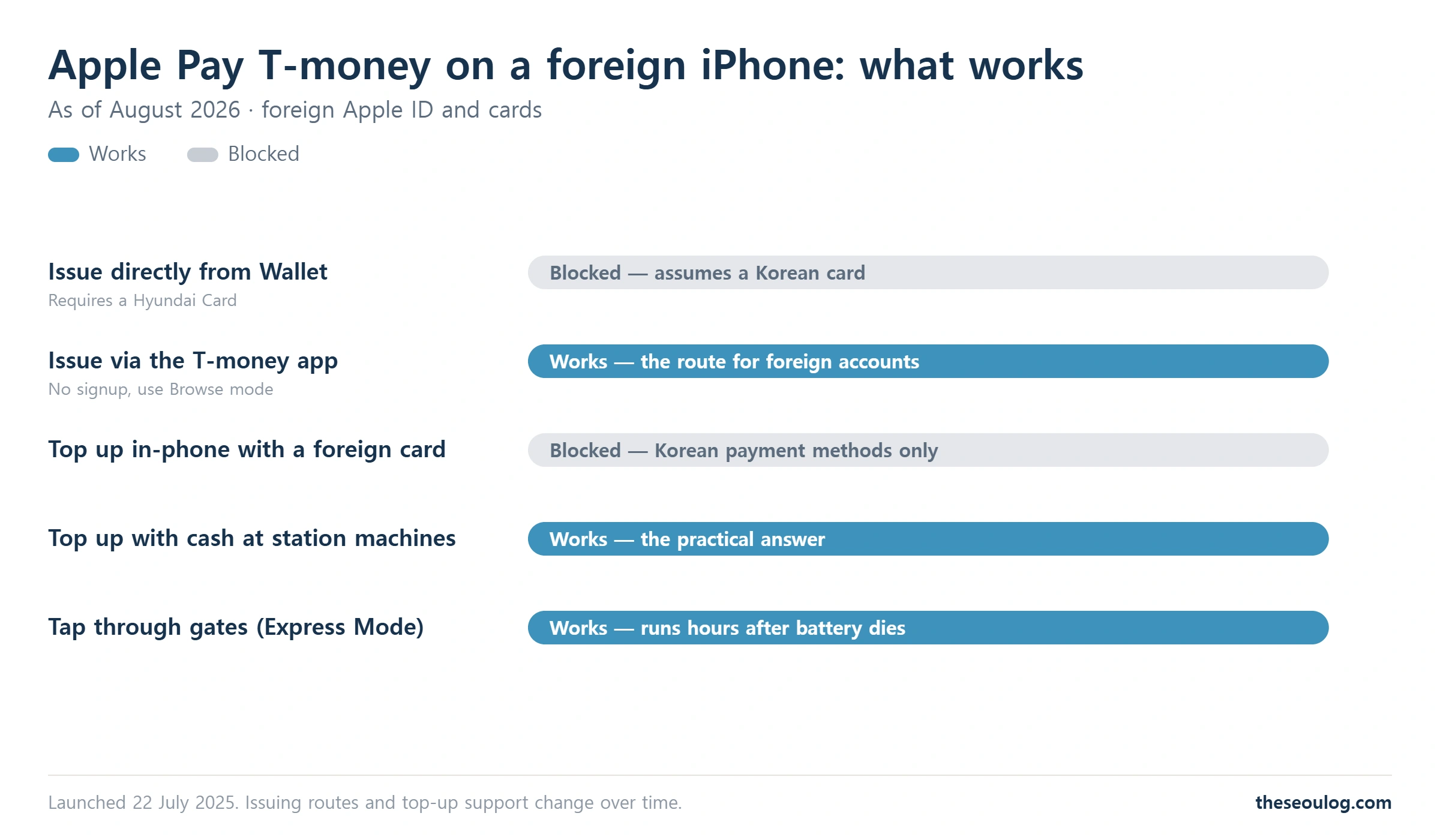
For visitors, though, two gates stand in front of the fare gate. Issuing the card directly from Wallet requires a Korean Hyundai Card, which stops foreign cards cold. And topping up inside the iPhone assumes Korean payment methods too.
“So can a visitor use it at all?” There’s still a way through—issue via the T-money app, top up with cash at station machines. Here’s the honest answer for iPhone people and Android people alike. Let’s get into it.
Contents
1. The whole picture first
2. Issuing on a foreign iPhone
3. If you carry Android
4. How far Apple Pay gets you in shops
5. Frequently asked questions
1. Delightful If It Works, No Loss If It Doesn’t! The Whole Picture First
| You are | The practical answer |
| iPhone, short trip | Issue via the app, top up with cash at stations. Or just buy a physical card |
| iPhone, repeat visitor | Issue once and every later trip gets faster. Express Mode is genuinely pleasant |
| Android (bought abroad) | Mobile T-money is unsupported. Physical T-money or WOWPASS |
| No patience for setup | Physical card: 3,000 won at any airport or convenience store, done in three minutes |
✔ The conclusion is simple
Apple Pay T-money is delightful if it works and no loss if it doesn’t. Fares and transfer discounts are identical to the plastic card; the only difference is whether you reach for your wallet. On a three-day trip, the setup can cost more time than it saves. Choosing the physical card is covered in our comparison.

✔ Worth reading first. Go through “Pick T-money, WOWPASS or the Climate Card by How You Top Up and Refund” and the calls ahead get a lot easier.
2. No Hyundai Card Required? Issuing on a Foreign iPhone
✔ A foreign Apple ID can get there
Install the T-money app from the App Store. Enter without signing up, via Browse mode. Then add T-money to Apple Wallet from inside the app. That route sidesteps the Hyundai Card that direct Wallet issuing demands.
Once issued, check Express Mode: tap through without Face ID, and it keeps working for a few hours after the battery dies. From here your fare-gate experience matches any local iPhone user’s.
Top-ups are the one remaining wall. In-phone charging assumes Korean cards and bank accounts; foreign cards fail. The practical answer is cash at the subway station charging machines. Newer machines are starting to take foreign cards, but cash is the certainty. Load 10,000 won at a time and you are fine.
3. Go Straight to Plastic! If You Carry Android
✔ Foreign Androids are unsupported
Android phones bought outside Korea don’t support mobile T-money—the system assumes a domestic handset and carrier verification. Go straight to plastic: T-money at 3,000 won, or WOWPASS if you want the built-in currency exchange.
Don’t count this as a loss. The physical card also pays at convenience stores, and losing one costs you only its balance. For a traveller, it’s the harder-to-break design.
4. Fine at Convenience Stores, Carry a Backup for Small Shops! How Far Apple Pay Gets You
✔ Convenience stores, big chains and department stores: yes
Separate from transit, Apple Pay tap payments with a foreign card now go through at all of those. Independent shops sometimes lack the terminal—where inserting the physical card’s chip is your fallback.
The all-iPhone day is getting closer. For 2026, one plastic card in your pocket is still the stable configuration. Install the T-money app and try Browse mode first!
In short
• Apple Pay T-money launched July 2025 — tap the gate with your iPhone
• Foreign cards cannot issue from Wallet directly; go through the T-money app’s Browse mode
• In-phone top-ups reject foreign cards; cash at station machines is the certainty
• Foreign Androids are unsupported — physical T-money or WOWPASS
• For a short trip, plastic is enough; the difference is only whether you reach for a wallet
Frequently asked questions
Can a foreign iPhone add T-money?
Yes. Direct Wallet issuing needs a Hyundai Card, but entering the T-money app without an account (Browse mode) and adding to Wallet from there works on foreign Apple IDs.
Can I top up with a foreign card?
Not inside the phone. Use cash at the subway station charging machines; newer ticket machines are gradually adding foreign card support.
Does the gate still work if my battery dies?
With Express Mode, yes — reserve power keeps it running for a few hours after shutdown. A phone left dead for a long time is not guaranteed.
Does mobile T-money work on Android?
Not on handsets bought abroad. Use a physical T-money or WOWPASS.
Is the fare different between plastic and Apple Pay?
No. Fares and transfer discounts are identical; only the gate gesture and the top-up options differ.
Information current as of 17 August 2026. Issuing routes and top-up support change over time.
Sources: Korean press coverage and Q&A on the Apple Pay T-money launch (22 July 2025) · on-the-ground checks of the app issuing route. Photograph: Wikimedia Commons
This article is based on the official information below. Rules can change, so please check the original before you travel.
· Korea Tourism Organization official site
Information as of 2026-08-30 (official listings and Google Maps as shown at publication). Updated when things change.