
- The short version: install Kakao T and you are covered.
- Four steps. Install and switch the language to English.
- Everything is decided at booking.


Who this is for
- Anyone who can’t explain a destination in Korean and would rather not try
- People whose foreign card just errored out and who are about to give up on the app
- Anyone who doesn’t want to stand on a Friday-night kerb watching full cabs pass
The moment a visitor loses money in a Seoul taxi is not on the meter. It’s before getting in. Hail from the kerb and you inherit three problems at once: a destination you cannot explain, a route you cannot judge, and—late at night—drivers who simply refuse. Call the car from an app and all three vanish.
The app is Kakao T. It’s the de facto standard for hailing in Korea, switches into English, and now takes foreign-issued credit cards. Uber works in Seoul with fewer cars, and Kakao runs k.ride, a version built for international wallets.
“Is the setup hard? Can I get a car at 1 a.m.?” Here’s the whole thing in the order you’ll actually do it, from setup at home to catching a car after midnight. Let’s get into it.
Contents
1. The three apps
2. Ten minutes of Kakao T setup
3. Calling a car, and naming the destination
4. What rides cost, and the late-night surcharge
5. Staying out of trouble
6. Frequently asked questions
1. Kakao T Alone Covers You! The Three Apps
| App | Who it suits | Payment |
| Kakao T | Nearly everyone — by far the most cars | Foreign cards accepted, or pay the driver directly |
| Uber | Anyone with an existing Uber account | Your saved card just works |
| k.ride | Users of Asian mobile wallets | Alipay, GrabPay and similar |
✔ The short version
Install Kakao T and you’re covered. Uber is the backup that needs zero setup if you already have it.
Do the setup before you fly. Registering and adding a card from inside Korea can snag on SMS verification and data issues. Do it on home Wi-Fi. Data-only eSIMs sometimes fail phone verification — a point we covered in the connectivity guide.
✔ This isn’t the only answer. “Riding the Seoul Subway” is the other option worth weighing.
2. Card Refused? No Problem! Ten Minutes of Kakao T Setup
✔ Four steps
Install and switch the language to English. Register with your phone number. Add your card under My Info → Payment Method—there’s a dedicated “Non-Korean Credit Card” option. If the card fails, set payment to “Pay to Driver” and settle in the car by card or cash. The hailing still works perfectly.
“Pay to Driver” is the traveller’s safety net. Even with no card attached, the dispatch function alone is worth the install—and every cab takes cards in the car, so you need no cash.
3. Nothing to Explain in the Car! Calling a Car, and Naming the Destination
✔ Everything is decided at booking
You fix the destination in the app’s search, so nothing needs explaining in the car. Hotels come up in English; restaurants resolve better under their Korean names—copy the name out of Naver Map and paste it in.
The standard tier (including Blue) is fine. Choose Venti for luggage days, and a fixed-fare option for airport runs if you want a predictable number. The car’s plate number appears on screen—match the plate before you get in. That one habit rules out both wrong cars and unlicensed ones.
4. Myeongdong to Gangnam About 20,000 Won! What Rides Cost, and the Late-Night Surcharge
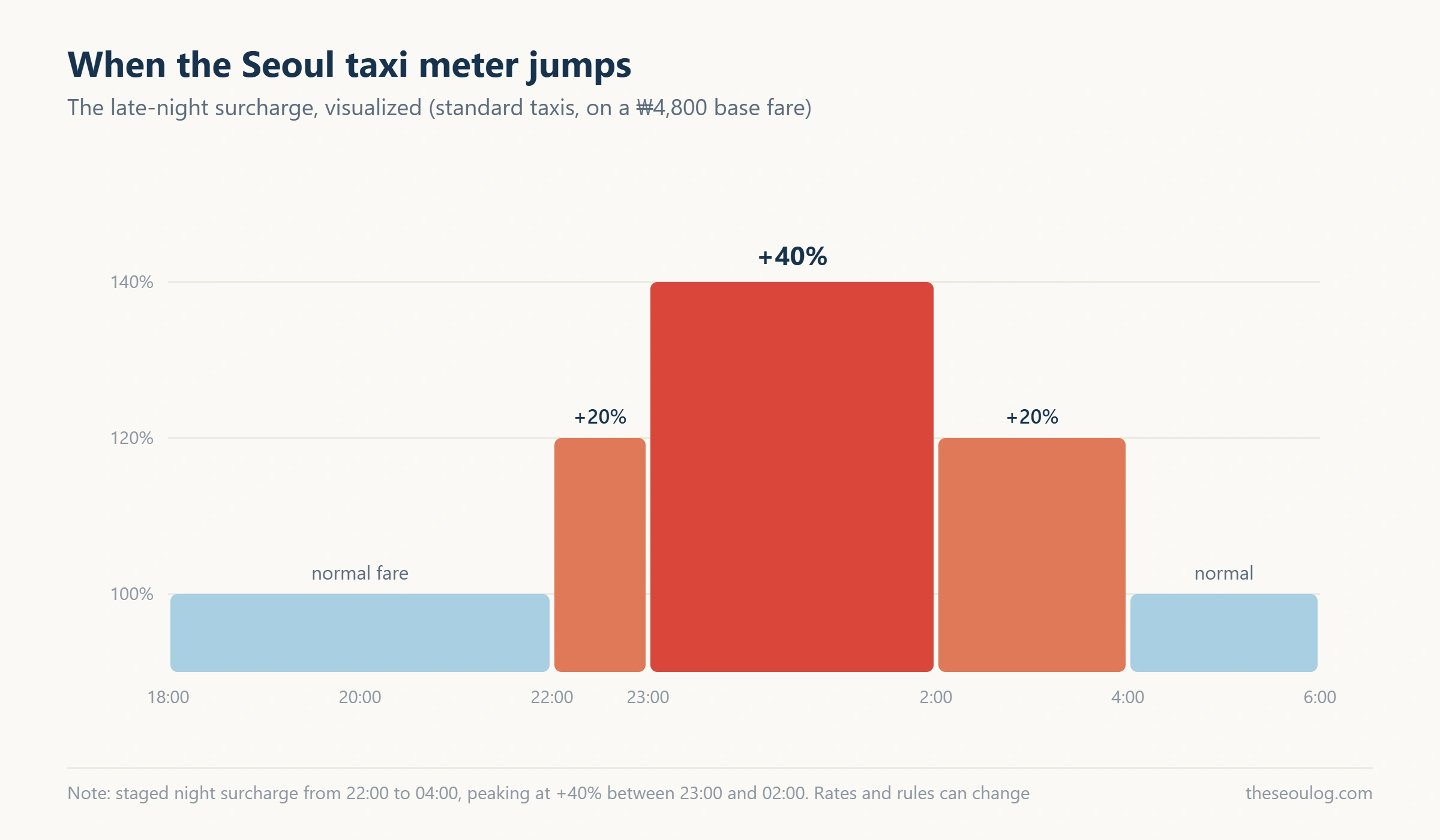
✔ Standard taxis start around 4,800 won
Myeongdong to Hongdae runs low five figures in won; Myeongdong to Gangnam about 20,000. After 10 p.m. a night surcharge applies in stages, adding roughly 20–40% at the peak.
Friday and Saturday nights are the hard case—demand spikes and waits stretch. As we argued in the neighbourhood guide, the strongest late-night strategy is staying within walking distance; the taxi is plan B.
5. Never Board a Solicited Ride! Staying Out of Trouble
✔ App dispatch logs the route and fare
Scenic-route worries mostly disappear. What to avoid is anyone soliciting rides at airports and stations. Board only at official ranks or through the app—a rule older than any app.
Leave something behind and the ride history connects you to the driver; receipts live there too. None of that exists for a kerb hail paid in cash, which is one more reason to route everything through the app. Ten minutes on home Wi-Fi the night before you fly—do it!
In short
• Kakao T alone covers Seoul — English interface, foreign cards accepted
• Register and add your card on home Wi-Fi before flying
• Card refused? Switch to Pay to Driver and settle in the car
• Paste Korean place names from Naver Map for destinations
• Surcharge after 10 p.m.; on Friday and Saturday nights, staying nearby beats hailing
Frequently asked questions
Does Kakao T work in English?
Yes — switch the language in settings. The flow matches any ride-hailing app you have used.
Can I add a foreign credit card?
Yes, under My Info → Payment Method, which has a Non-Korean Credit Card option. If it errors, choose Pay to Driver and pay in the car.
Does Uber work in Korea?
Yes, mainly in Seoul, with your existing account and saved card. Kakao T has far more cars, and Uber thins out quickly outside the capital.
Will I get scammed on the fare?
With app dispatch the route and fare are recorded, so effectively no. Never take a ride from someone approaching you at the airport or station — official ranks and apps only.
Can I get a taxi late at night?
Yes, though Friday and Saturday nights mean long waits and surcharges. If your evenings run late, book accommodation you can walk home to.
Information current as of 16 August 2026. Fares, surcharges and app interfaces change.
Sources: Kakao T’s payment menu (foreign card registration) · Korea Tourism Organization visitor guidance · on-the-ground use. Photograph: Wikimedia Commons
This article is based on the official information below. Rules can change, so please check the original before you travel.
· Korea Tourism Organization official site
Information as of 2026-08-30 (official listings and Google Maps as shown at publication). Updated when things change.